Campaign Brief
Define your offer, target companies, buyer roles, evidence, exclusions and meeting standard. Agree how a useful opportunity reaches sales.
9 fields to complete
Free B2B cold calling starter kit
Download an editable campaign brief, script worksheet and call tracker. See a completed example, then adapt the files to your own offer and buyers.
Excel workbook, PDF guide and CSV tracker. No email required.
The kit gives you working documents to complete and keep. Use them alongside CallTeam’s 100 free cold calling scripts and existing sales tools.
01 / Working files, ready to edit
One workbook holds four sheets. The PDF explains the workflow. The CSV gives you a plain call log when that is all you need.
Define your offer, target companies, buyer roles, evidence, exclusions and meeting standard. Agree how a useful opportunity reaches sales.
9 fields to completeDraft the opening, relevance question, discovery, objection response and meeting request. Keep room for what the buyer actually says.
8 conversation promptsRecord each attempt, outcome, next action, due date and owner. Outcome dropdowns and summary counts cover 200 prepared rows.
11 columns / 7 outcome choicesSee a fictional ERP campaign for finance buyers. Follow the completed fields from the buyer and offer through to the sales handoff.
Illustrative example included02 / A completed example
This fictional example uses an ERP provider speaking with CFOs at wholesale distributors. It shows how to complete the documents.
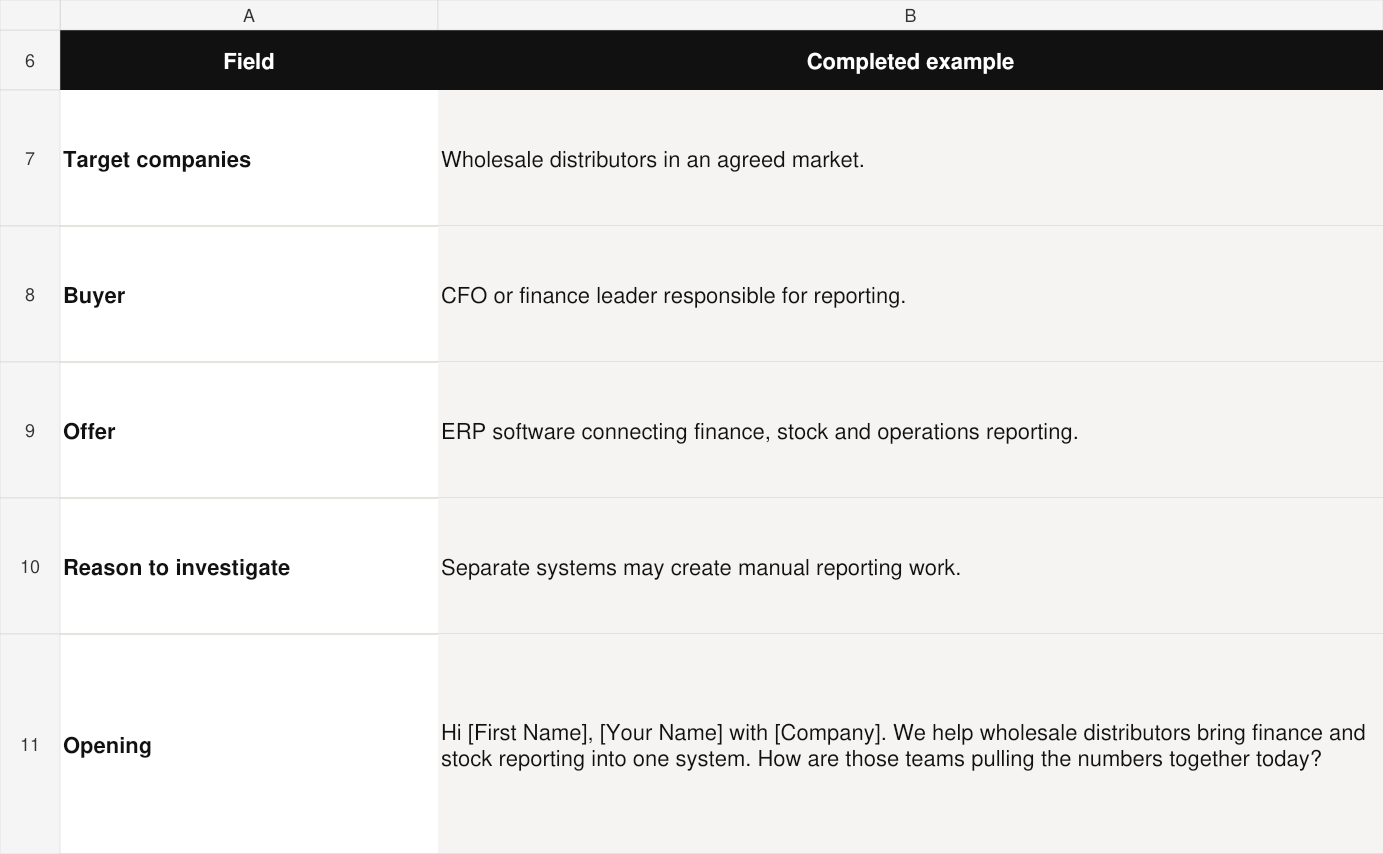
An opening to adapt
“Hi [First Name], [Your Name] with [Company]. We help wholesale distributors bring finance and stock reporting into one system. How are those teams pulling the numbers together today?”
Explore the answer: Where does that process still need someone to combine or check information manually?
Approve the offer statement before use. The caller checks the situation and records what the buyer confirms.
Record the reporting task, existing approach, relevant people and agreed purpose. Leave budget, integrations and buying timeline open until confirmed.
03 / From download to daily use
Complete the brief first. Use the worksheet to prepare and practise, then keep the tracker current as the campaign runs.
Agree the market, buyer, offer and meeting standard. Use the Campaign Preview to explore a starting approach for your market.
Choose a relevant script and complete the worksheet. The Script Checker can help you review its wording before practice.
Log each call attempt with the same Contact ID for repeat calls. Capture the outcome, callback date and owner. Stop the sequence when the contact asks you to.
04 / Choose a closer starting point
These three paths show how the kit connects to our existing resources. Use the full library for other offers, buyers and industries.
ERP and finance buyers
Use finance and operations language to explore the current system and a relevant discovery conversation.
Managed IT services
Explore the current provider, operating gaps and a useful reason to review the service.
Logistics and operations
Prepare for an operational conversation about overflow, timing and the work a provider could support.
05 / The team behind the resources
CallTeam runs human-led B2B calling and appointment-setting campaigns, from prospect research and follow-up to qualification and sales handoff.
Our published FinTech case study explains how a payments campaign connected a focused market, relevant conversations and a product-demo handoff. It reported 15 qualified demos in 90 days and three closed deals.
Read the full campaign case studyBefore you download
The files are yours to adapt. Use the formats that fit your team’s workflow.
The download contains an Excel workbook, a PDF quick-start guide and a blank CSV call tracker. The workbook has four sheets: Campaign Brief, Script Worksheet, Call Tracker and Worked Example. The first three are ready for your inputs. The final sheet shows a fictional ERP campaign.
It is free, with no email signup. Download the complete ZIP or choose the workbook, PDF or CSV separately. You complete the files in your own systems.
The 100 complete scripts remain in CallTeam’s online script library, searchable by buyer, industry and objective. The starter kit provides working documents and selected links so you can prepare a campaign around the script that fits.
The workbook is an XLSX file designed for Excel. You can import it into Google Sheets, then check that the outcome dropdowns and summary counts work as expected. The CSV opens as a plain call log without formulas or dropdowns. Use the PDF for the short instructions and example.
Use one row per call attempt and keep the same Contact ID when you call that person again. Choose an outcome, record the next action and add its due date and owner. The workbook summary counts outcome entries in the 200 prepared rows, rather than unique prospects. Extend the summary ranges if you add more rows.
Yes. Replace the ERP example with your actual offer, buyers, approved capabilities and qualification standard. The fictional example demonstrates how to complete the fields. Use the industry scripts and playbooks for a closer starting point.
Yes. CallTeam can scope prospect research, list preparation, human calling, follow-up, qualification, appointment setting and sales handoff. Bring your offer, target buyers and current materials to a strategy call so we can agree the work and responsibilities.
Make the next step practical
Start with the kit. When you want a calling team to run the work, bring us your offer and target buyers.
Need more leads, more calls, more booked appointments, better sales execution, or a stronger pipeline system? Send a message and we will get back to you.